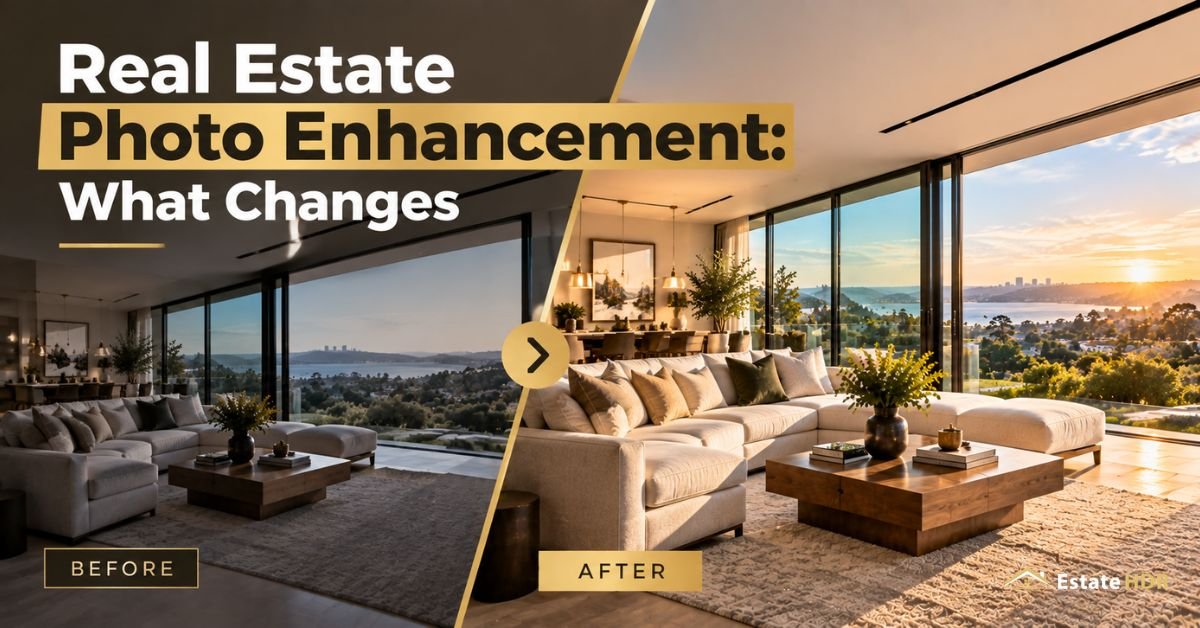
By Estate HDR Team | Published: September 2026
A listing goes live at 7 a.m. The photos are sharp. Something still feels off. The living room reads gray, the window behind the sofa is a white blank and the door frame leans a couple of degrees. Nothing is broken here. Nothing looks finished either. Real estate photo enhancement is the layer that closes that gap. In 2026 the tools got faster while the rules around them got stricter. This post covers what enhancement changes in a finished image, where the compliance line sits and how to judge an editor's files before you send them a hundred more.
Quick Answer at a Glance
Enhancement is everything that happens to a photo after the shutter closes. An editor corrects exposure, contrast, white balance, lens distortion, verticals and window brightness so the room reads the way it looked in person. Editing starts at $0.80 per photo on a 24 hour standard turnaround. Accuracy is the target, not drama.
| Question | Short answer |
|---|---|
| What is it | Post-capture correction applied to a finished image file |
| What gets adjusted | Exposure, contrast, color accuracy, verticals, window pulls, noise |
| What it is not | A shooting method. Bracketing happens at the camera, enhancement happens after |
| Starting price | $0.80 per photo |
| Turnaround | 24 hours standard, 12 hour rush available |
| Pass or fail test | Does the room match what a buyer would see standing in it |
Enhancement Terms Worth Knowing
Editors use a small vocabulary. Learn five words and your briefs get sharper.
- Window pull: the edit that recovers the view outside a bright window so the glass shows trees or a yard instead of a white rectangle.
- Color cast: an unwanted tint across the whole frame, usually orange from bulbs or blue from shade, that makes white walls look dirty.
- Vertical correction: straightening walls, door frames and window edges so they run parallel to the sides of the photo.
- Clarity: a mid-tone contrast adjustment that makes texture in carpet, tile and cabinetry readable without adding an outline.
- Halo: the pale glow that appears around a roofline or a window frame when contrast gets pushed instead of blended. It's the fastest way to spot a rushed edit.
What Real Estate Photo Enhancement Changes in a Finished Image
Start with brightness. A camera meters for an average. An interior with a bright window behind it underexposes every time. Enhancement lifts the shadows without flattening the frame, then holds highlights back so the ceiling doesn't glow. Contrast comes next. Too little and the room looks foggy. Too much and the corners go black.
Color accuracy does more work than most people expect. Kitchen bulbs push orange. North facing windows push blue. When both land in one frame you get a room that's warm on one side and cold on the other, which no buyer consciously notices but everyone feels. A careful editor neutralizes the whites, keeps wood tones honest and leaves the warm lamp glow alone because that part is real.
Then geometry. Wide lenses bend straight lines near the edges of the frame. Door frames lean. Kitchen islands stretch. Verticals are corrected after the color work so the crop only has to be set once. On a two story exterior the gap between a leaning house and a square one is the gap between a snapshot and a listing photo.
Window pulls are the part people actually pay for. Recovering the yard behind the glass takes masking by hand. It's slow. Get it wrong and the window edge glows or outdoor green leaks onto a white curtain. After that come the small ugly things: a dark TV screen mirroring the photographer, a cold fireplace, a patchy February lawn.
Why the Same File Looks Different on Every Portal
Portals don't show your file. They show their copy of it. Upload a 25 megabyte print export and the site resizes, recompresses and serves something much smaller to a phone. Enhancement has to survive that squeeze. Sharpening that looks crisp at full size turns crunchy at thumbnail width. Deep saturation goes cartoonish once compression hits it.
The second trap is color space. Files saved in Adobe RGB and dropped into a browser that assumes sRGB come back dull and slightly wrong (you have probably squinted at one of these and blamed the screen). Most portals want sRGB. Ask for a web sized sRGB set for the listing plus a full resolution 300 DPI export for brochures. Two files, one edit, no arguments later.
HDR and Flambient Editing Service Snapshot
|
|
| Field | Detail |
|---|---|
| Service | HDR and flambient photo editing">flambient photo editing |
| Accepted inputs | CR2, CR3, ARW, NEF, DNG, RAF, RW2 plus JPG and TIFF. 3 to 7 brackets at -2, 0, +2 EV |
| Delivered formats | Full resolution 300 DPI JPG for print plus a web optimized MLS JPG. sRGB standard, Adobe RGB (1998) on request |
| Turnaround | 24 hours standard, 12 hour rush available |
| Starting price | $0.80 per photo |
| Client rating | 4.99 out of 5 from 340+ reviews |
Full inclusions, sample files and format notes live on the HDR photo editing service page.
Editing It Yourself Versus Sending It Out
Most photographers can edit. The question is whether those hours pay better than shooting does. Here is the math on a typical 30 image residential set.
| Factor | Editing in house | Outsourced editing |
|---|---|---|
| Hands-on time per image | 8 to 15 minutes | about 10 seconds to upload |
| Time for a 30 image set | 4 to 7 hours | under 5 minutes |
| Cash cost per image | $0 plus your own hourly rate | $0.80 |
| Cash cost for the set | one working evening | $24.00 |
| Turnaround | whenever you finish it | 24 hours, or 12 with rush |
| Volume discount | none | 5% at 20+, 10% at 50+, 15% at 100+ |
Two shoots a week is roughly ten unpaid hours a month at the desk. That is the real comparison.
Where Enhancement Crosses Into Misrepresentation
There is a line. Most MLS rulebooks now draw it in writing. In 2026 boards began enforcing it on AI edited files the way they already did on virtual staging. The test is simple. Did the edit correct the camera or did it change the property? Fixing an underexposed room corrects the camera. Painting out a hairline crack changes the property. One is enhancement. The other is a rule violation waiting for a complaint.
Boards generally allow changes to personal property: furniture, art, plants, rugs and in many markets wall paint color. Those edits usually need a visible disclosure placed on the image itself. A note in the caption or the remarks field is not enough under most policies. Several MLSs also want the original unedited frame in the same photo set.
What gets flagged is specific. Adding a skyline, a mountain or a water view that cannot be seen from that window is prohibited. So is deleting power lines, a water tower or a highway a buyer would want to know about. Anything hiding a defect sits in the same bucket: water stains, roof damage, sagging gutters, cracked driveways.
Good item removal is scoped to things that move. Cars, bins, hoses, cords and pet bowls come out at $2.00 per image because none of them convey with the house. A sagging gutter stays. If you would disclose it on paper, it stays in the photo.
The standards most agents already sign up to say the same thing in plainer language. NAR asks members to present a true picture in their advertising. The FTC treats materially misleading ads as deceptive in any industry. Penalties differ by board, from a warning letter to a fine per listing. The listing agent carries the responsibility even when an outside editor made the change.
How to Brief an Editor So the First Pass Comes Back Right
Most bad edits are bad briefs. Five things fix that.
- Send one reference frame you already like. A single approved image tells an editor more about your taste than a paragraph of adjectives ever will.
- Name your white. Point at a wall, a countertop or a run of cabinets and say that should read neutral. Ambiguity about white is where color casts survive.
- Write a do-not-touch list. Cracks, stains, sloped floors, dated fixtures and anything a buyer has a right to see stay exactly as shot.
- State the delivery you need. Web sized sRGB for the portal, full resolution for print, plus the deadline in your timezone rather than theirs.
- Order a test batch of five before you send fifty. Judge those five against the checklist below and only then commit volume.
How Estate HDR Handles an Enhancement Order
- Submit: drag the bracket set or single frames into the upload window, add your brief and pick standard or rush. RAW files go up untouched with nothing lost before an editor opens them.
- Produce and QA: a human editor blends, corrects color, straightens verticals and masks windows by hand. A second pass checks the whole set for consistency before delivery. Revisions stay unlimited until the files match your brief.
- Delivery: a full resolution 300 DPI JPG for print plus a web optimized MLS JPG, in sRGB by default or Adobe RGB (1998) on request, inside 24 hours or 12 with rush.
See delivered work across eight property categories in the portfolio. Or run your own test batch first. The free first order exists for exactly that.
A Quality Checklist for Judging Returned Files Before You Pay for Volume
Open the test batch at 100% zoom on a real monitor. Not a phone. Work this list in order, because the failures at the top are the ones clients notice first.
- Halos: check a roofline against sky and the inside edge of every window. A pale outline means contrast was pushed instead of blended.
- Verticals: lay a straight edge along a door frame. Two degrees of lean shows even at thumbnail size.
- Neutral whites: find a white wall or a white cabinet. If it reads pink, green or beige the color work is not finished.
- Window detail: the view outside should carry real texture. A gray wash or a solid white block means the pull got skipped.
- Shadow noise: look under the kitchen island and inside closet openings. Lifted shadows go grainy there first.
- Set consistency: open image 3 and image 14 side by side. The same wall should be the same color in both.
- Light logic: if a sky was replaced, lawn shadows have to fall the way that new sun would put them.
- File specs: confirm pixel dimensions, color profile, DPI and file size against what you asked for.
Two failures across five images is a conversation. Four is a different vendor. Keep the test batch on file. It becomes your reference set for every order after it.
What Photo Editing Costs in 2026
Per image editing sits well under a dollar for most residential work. Estate HDR starts at $0.80 per photo for HDR and flambient work, with tiered discounts taking 5% off at 20 images, 10% at 50 and 15% at 100. Item removal runs $2.00 per image because it is hand rebuilt texture rather than a slider move. Rush at 12 hours covers shoots that land the afternoon before a launch.
Current tiers sit on the pricing block. Compare the number against your own hourly rate rather than against the cheapest quote you can find. A cheap edit you have to redo costs a full listing cycle.
Take a brokerage coordinator running eight listings a week in a mid size metro. Each shoot returns 28 frames. That is 224 images a week. At $0.80 the raw cost is $179.20 and the 100+ tier trims it to roughly $152. Files go up at 6 p.m. and come back web ready the next morning, which puts Tuesday shoots live on Wednesday instead of Friday.
About the author
The Estate HDR Team edits real estate imagery full time for photographers and brokerages across the United States. More than a million photos have moved through the studio for 500+ agencies. This post reflects how files are corrected and checked before delivery. Estate HDR was founded in 2020 and its production, retouching and quality leads are named on the studio team page. The studio profile sits on the About Estate HDR page.
Getting Files Back You Do Not Have to Argue With
Good real estate photo enhancement is boring in the best way. The room looks like the room. Nothing glows. Nothing leans. The window shows a yard. Estate HDR edits to that standard on every file, with unlimited revisions until the set matches the brief you wrote. The first order is free. Run the checklist above on our work before any money moves. Questions go to info@estatehdr.com. For the capture side of this, including bracket depth and how window blending works, read HDR real estate photo editing explained.
Frequently Asked Questions
How much does photo editing cost per image for a listing?
Residential editing is priced per image, not per hour. Estate HDR opens at $0.80 a photo for HDR and flambient work and drops 5%, 10% or 15% as volume climbs past 20, 50 and 100 images. Specialty work is priced separately: item removal at $2.00, day to dusk at $4.00, virtual twilight at $6.00 and virtual staging at $8.00 per image. Floor plans start at $15.00 each. Nothing is billed until you approve the first order.
How long does editing take for a full shoot?
Standard turnaround is 24 hours from upload, which covers most single family sets. A 12 hour rush option exists for shoots that land the day before a launch. Volume rarely changes the clock much because sets are split across editors rather than queued behind one person. Plan your upload around the listing go-live time, not the shoot time. Uploading the same evening you shoot buys you a full extra business day of buffer.
Can I use edited photos on Zillow, Redfin and my MLS?
Yes, provided the edits stay inside your board's rules. Corrective work such as exposure, white balance, straightening and window recovery is universally accepted. Anything that adds or removes physical features usually needs disclosure or is banned outright. Portals also apply their own image specs and compression. Upload the sRGB web version rather than a 40 megabyte print file. Check your local MLS policy document once a year because these rules changed in several markets during 2025 and 2026.
Is AI editing good enough for professional listings?
For a quick social post, often yes. For a listing set, less often. Automated tools handle global brightness and simple color shifts well. They struggle with mixed lighting, reflective glass, complex window masks and knowing which imperfections must stay. They also apply the same recipe to every frame, which is how a set ends up inconsistent. Many studios now use AI for a first pass and put a human on top of it. Ask any vendor which parts are automated.
Who owns the copyright once an editor works on my files?
In the United States the photographer normally holds copyright in the original image. Editing it does not transfer that ownership to the editing vendor. Reputable studios work as a service provider and hand back full rights with the files. Read the terms before your first bulk order. Separately, agents should confirm what their photographer's license actually permits, because listing photos are frequently licensed for one listing period rather than forever.
What is the difference between editing and virtual staging?
Editing corrects what the camera recorded. Staging adds objects that were never in the room. The two carry very different disclosure obligations. A corrected exposure needs no label anywhere. A digitally furnished living room needs a visible disclosure on the image under most MLS policies. Many boards also want the empty original in the same set. Price differs too, since staging is per room design work rather than per frame correction.
Does editing work on photos shot with a phone?
It works, within limits. Phone files carry less highlight and shadow information than a RAW file from a camera. A blown window cannot be recovered from data that was never captured. Editors can still fix color, straighten lines, reduce noise and clean up distractions. For anything above entry level pricing, shoot brackets on a camera. Save phone shots for supplementary angles rather than the hero image on the listing.
Why do my photos look different on my phone than on my laptop?
Three reasons usually stack up. Screens ship with different brightness and color calibration out of the box. Phone displays often boost saturation and contrast automatically. And portals recompress your upload, which shifts fine detail and color slightly. Judge your files on one calibrated monitor and treat that as the source of truth. If a set looks right there and wrong everywhere, the file is fine and the display is not.
Can editing rescue a blurry or badly exposed photo?
Exposure problems are often fixable. Focus problems are not. A dark frame with detail still buried in the shadows can be lifted cleanly. A frame where the highlights are pure white has no data left to recover. Sharpening a soft image only makes the softness obvious. If the shoot produced motion blur or missed focus, reshoot that room. Editing buys back light, never sharpness that was never recorded.
How many revisions should I expect on a first order?
On a first order with a new vendor, two or three notes across a set is normal while they learn your preferences. After that, revisions should be rare. Keep your feedback specific: name the image number and the exact issue rather than saying it looks off. Vendors offering unlimited revisions are worth more than they sound, because the cost of a bad set is a delayed listing, not a refund.
SEO & Content Manager
✓ Verified AuthorSEO & Content Manager is a digital content strategist and architectural media researcher at Estate HDR, covering real estate photography workflows, property marketing trends, and MLS editing standards.
Ready to Elevate Your Real Estate Listings?
Experience 24-hour turnaround HDR editing, virtual staging, and day-to-dusk conversions with zero risk.